
Toolship
The developer's browser command center.
Toolship is a powerful browser extension built for web developers, QA engineers, and power users. Create sophisticated handler rules to intercept, modify, redirect, or block HTTP requests. Inspect and manage browser storage. Capture screenshots. Analyze security headers. All processing happens locally — your data never leaves your device.
What Toolship can do
Rule-Based Handler System
Create named handler rules combining filters and actions. Handlers fire when all filter conditions match an HTTP request — enabling sophisticated request control.
Rich Filter Types
Filter by hostname, URL, method, resource type, request origin, protocol, port, headers, query parameters, day of week, and time of day. Combine with AND/OR logic.
Powerful Actions
Block, redirect, or modify requests. Inject custom JS and CSS. Manage headers and CSP. Switch environments. Control browser tabs. Inspect and edit storage.
Screenshot Capture
Capture visible area, full page, selected region, or specific elements as high-quality screenshots. Export as PNG or copy to clipboard.
Security Analysis
Analyze Content Security Policies, inspect CORS headers, audit cookies, and identify potential security issues on any page.
Storage Inspector
Read and write IndexedDB, localStorage, sessionStorage, and cookies. Full CRUD operations from within the extension.
Network Log
Real-time monitoring of all browser requests with filtering, search, and detailed inspection of headers, payloads, and response data.
Page Dev Tools
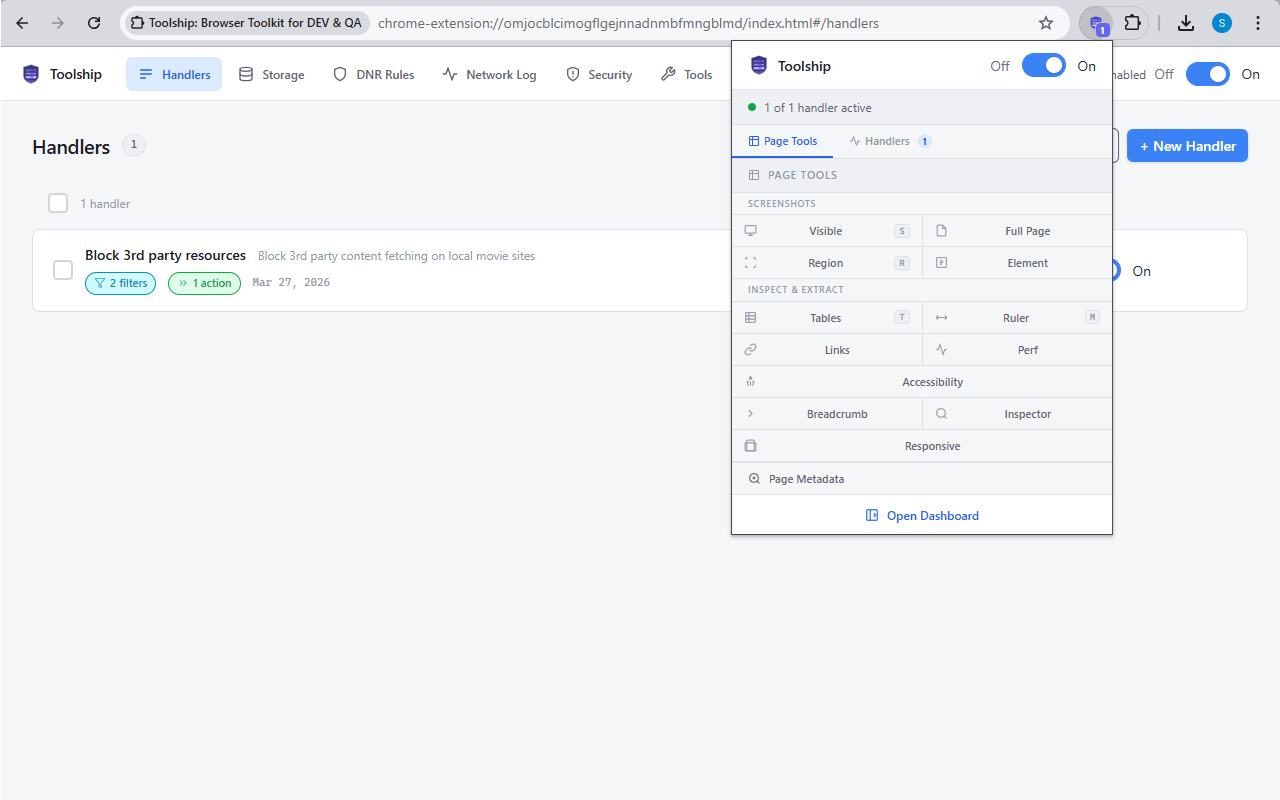
Element ruler, link extractor, table extractor, performance metrics, accessibility checker, responsive preview, and page metadata inspector.
100% Local & Private
All your data — rules, settings, configurations — is stored in IndexedDB on your device. Nothing is ever transmitted to any external server.
See it in action
What developers say
"Toolship replaced three separate extensions for me. The handler system is incredibly flexible — I can redirect API calls, inject auth tokens, and block third-party scripts all from one place."
"We use Toolship across our entire QA team for environment switching. The export/import feature means everyone has the same rules configured in minutes."
"The storage inspector alone is worth it. Being able to read and write IndexedDB and localStorage directly from the extension saves me so much time during debugging."
"The CSP Analyzer and CORS Inspector are genuinely useful tools. I use them in every security review of our web apps."
Frequently asked questions
Which browsers does Toolship support?
Toolship supports Google Chrome, Microsoft Edge, Mozilla Firefox, and Opera. Chromium-based browsers use Manifest V3; Firefox uses Manifest V2.
Is Toolship free?
Yes. Toolship is completely free for personal and commercial use, forever. There are no premium tiers, no subscriptions, and no hidden fees.
Does Toolship send my data anywhere?
No. All data — your handler rules, settings, and anything processed by the extension — is stored locally in IndexedDB on your device and never transmitted to any server.
Can I use Toolship in incognito mode?
Yes, but you need to explicitly enable extension access in incognito mode from your browser's extension settings. Toolship will show a warning indicator in the popup if incognito access is not enabled.
What is a Handler?
A Handler is a named rule consisting of filters (conditions) and actions (what to do). When all filters match an HTTP request, all actions in that handler are executed. Handlers can be individually enabled/disabled, reordered, and imported/exported.
Can handlers be backed up or transferred?
Yes. Handlers can be exported as JSON files and imported back — making it easy to back up your rules or share them with teammates.
What's the difference between the popup and the dashboard?
The popup is a mini-dashboard accessible by clicking the extension icon. It provides quick access to page tools and handler toggles. The full dashboard opens as a browser tab and provides access to all features including the network log, storage inspector, and security tools.
Do the declarativeNetRequest actions support all filter types?
Block, redirect, and header modification actions use the browser's declarativeNetRequest API and are limited to URL-pattern matching. Filters like Header, Referrer URL, and Day/Time are observed via the webRequest API for compatibility.
Privacy Policy
Toolship — Privacy Policy
Effective Date: March 29, 2026 Last Updated: March 29, 2026
---
1. Overview
This Privacy Policy describes how Toolship ("the Extension", "the Software") handles information in relation to its users. It applies to the Toolship browser extension and any associated interfaces.
Toolship is developed and maintained by the Utilsware Team ("the Developer"). The Developer is deeply committed to user privacy. This policy is written in plain language so that every user can clearly understand what data is and is not collected.
If this policy is updated at any time, the revised version will be published at the same location with an updated Effective Date at the top of this document. Continued use of the Extension after any such update constitutes acceptance of the revised policy. Users are encouraged to review this document periodically.
---
2. Our Core Commitment
We do not collect, transmit, store, share, or sell any of your data — ever.
No information you interact with while using Toolship leaves your device. Nothing is sent to the Developer's servers. Nothing is sent to any third-party server. The Extension operates entirely within your local browser environment.
---
3. Data We Do NOT Collect
To be absolutely explicit, the following data is never collected by the Developer in any form:
- Your name, email address, phone number, or any other personally identifiable information (PII)
- Your IP address or device identifiers
- Your browsing history or the URLs you visit
- The content of HTTP requests or responses processed by the Extension
- HTTP headers, cookies, or query parameters handled by your rules
- Any data stored in your browser's IndexedDB, localStorage, or cookies on any website
- Your handler rules, filter configurations, or action settings
- Any data from websites you visit while using the Extension
- Location data of any kind
- Demographic or profile information
---
4. How the Extension Works — All Processing is Local
Toolship is a browser extension that allows you to create rules to manage HTTP/HTTPS requests, browser tabs, and local storage on websites you visit. All of this functionality operates exclusively on your local device, within your browser.
Specifically:
- Handler rules and settings you create are stored in your browser's local IndexedDB storage on your own device. This data never leaves your browser and is never transmitted anywhere.
- Request modification, redirection, header injection, and all other rule-based actions are executed locally by your browser using the browser's built-in extension APIs (such as
declarativeNetRequestandscripting). The Developer has no visibility into these operations. - Tab management actions (opening, closing, grouping tabs) are performed locally within your browser session only.
- IndexedDB bridge functionality — any interaction with website storage via the Extension is performed locally within your browser and is not transmitted to the Developer or any external party.
At no point does any data processed by the Extension reach the Developer's servers or any other external server.
---
5. Analytics — Current Status and Future Plans
Current Status
As of the effective date of this policy, the Extension collects zero analytics. No usage data, feature interaction data, or any other telemetry is collected or transmitted.
Possible Future Analytics
At some point in the future, the Developer may introduce optional, anonymous analytics to understand how the Extension is used at a high level. If and when this is implemented, the following principles will strictly apply:
- No PII — Analytics will never include any personally identifiable information of any kind.
- No user-specific data — Analytics will be fully anonymous and aggregated. There will be no way to trace any data point back to an individual user.
- Feature-level only — The sole purpose of analytics would be to understand which features are used in general (e.g., "X% of users use redirect rules"), not to track individual behavior.
- User control — If analytics are ever implemented, users will be provided with a clear, accessible option within the Extension to opt out or disable analytics entirely. Analytics will never be forced or hidden.
- Policy update — This Privacy Policy will be updated with a new Effective Date before any analytics are introduced, clearly describing what is collected and how it is used.
There are no current plans for when or whether analytics will be implemented.
---
6. Data Sharing and Sale
The Developer does not share, sell, rent, trade, or otherwise disclose any user data to any third party — because no user data is collected in the first place.
The Developer will never sell user data. This applies now and in the future, unconditionally.
---
7. Third-Party Services
Toolship does not integrate with any third-party analytics platforms, advertising networks, data brokers, or tracking services. No third-party code is embedded in the Extension that collects or transmits user data.
---
8. Children's Privacy
The Extension is not directed at children under the age of 13. The Developer does not knowingly collect any information from children. Since the Developer collects no data from anyone, no special handling for children's data is applicable. If you believe a child is using the Extension in a way that raises a privacy concern, you may contact the Developer at the address below.
---
9. Security
Because no user data is transmitted to or stored by the Developer, there is no server-side data to secure. All your data — your rules, settings, and anything processed by the Extension — remains in your own browser, protected by your browser's own security model.
---
10. Your Rights
Since the Developer collects no personal data, there is no personal data held by the Developer to access, correct, export, or delete. Your Extension data (rules, settings) lives entirely in your own browser and is under your full control at all times. You may clear it at any time through your browser's extension management or storage settings.
---
11. Changes to This Policy
If this Privacy Policy is updated, the revised version will be published at the same location (the PRIVACY_POLICY.md file in the Extension's repository and/or the Extension's store listing) with an updated Effective Date at the top of the document. The Developer will not send active notifications for policy updates. Users are responsible for reviewing this document periodically to stay informed.
Any material change — particularly the introduction of any form of analytics or data collection — will be reflected in this document before the change takes effect.
---
12. Contact
If you have any questions, concerns, or requests regarding this Privacy Policy, you may contact the Developer at:
Utilsware Team Email: utilsware.admin@gmail.com Website: utilsware.com GitHub: github.com/shridhar-tl
---
Toolship was originally developed in 2018 under the name "Dev Assist" and has since been rebranded and relaunched as Toolship. This Privacy Policy applies to all current and future versions of the Software under the Toolship name.
License Agreement
Software License Agreement
Copyright © 2018–2026 utilsware (utilsware.com) All rights reserved.
---
1. Definitions
- "Software" refers to Toolship, including all source code, compiled binaries, browser extension packages, documentation, and associated files.
- "Developer" refers to the utilsware team, the sole copyright holder of the Software.
- "User" refers to any individual or entity that downloads, installs, accesses, or uses the Software.
- "Distribution" refers to any act of copying, sharing, publishing, uploading, or otherwise making the Software available to third parties.
---
2. Grant of License
The Developer grants the User a worldwide, royalty-free, non-exclusive, non-transferable license to:
- Download, install, and use the Software on any number of devices.
- Use the Software for personal or commercial purposes, free of charge, without any licensing fees, now and in the future.
This license is granted at no cost and shall remain free of charge indefinitely.
---
3. Restrictions
The following are expressly prohibited without prior written approval from the Developer:
1. Redistribution — You may not copy, distribute, publish, upload, sell, sublicense, or otherwise make the Software available to any third party in any form (modified or unmodified) without obtaining written permission from the Developer.
2. Modified Distribution — Even where written approval for redistribution has been granted, the Software must be distributed exactly as provided by the Developer — unmodified, intact, and without alteration to any files, metadata, extension package contents, or associated documentation.
3. Rebranding — You may not remove, alter, or replace any copyright notices, branding, trademarks, or attribution related to Toolship or the Developer.
4. Commercial Redistribution or Resale — You may not sell, rent, lease, or otherwise monetize the Software or any portion of it.
To request written approval for redistribution or any other use not covered by this license, contact: utilsware.admin@gmail.com
---
4. Free Forever
The Software is provided free of charge for all Users — individuals, startups, small businesses, and large enterprises alike — for both personal and commercial use. This commitment is irrevocable. The Developer will never charge a fee for the base use of the Software as described in Section 2.
---
5. Disclaimer of Warranties
THE SOFTWARE IS PROVIDED "AS IS", WITHOUT WARRANTY OF ANY KIND, EXPRESS OR IMPLIED, INCLUDING BUT NOT LIMITED TO THE WARRANTIES OF MERCHANTABILITY, FITNESS FOR A PARTICULAR PURPOSE, TITLE, AND NON-INFRINGEMENT.
THE DEVELOPER MAKES NO REPRESENTATIONS OR WARRANTIES THAT:
- The Software will meet your requirements or expectations.
- The Software will be error-free, uninterrupted, secure, or free of bugs or viruses.
- Any defects or errors in the Software will be corrected.
- The Software is compatible with any particular browser version, operating system, or platform.
Use of the Software is entirely at your own risk.
---
6. Limitation of Liability
TO THE MAXIMUM EXTENT PERMITTED BY APPLICABLE LAW, IN NO EVENT SHALL THE DEVELOPER BE LIABLE FOR ANY DAMAGES WHATSOEVER, INCLUDING BUT NOT LIMITED TO:
- Direct, indirect, incidental, special, consequential, or punitive damages.
- Loss of data, revenue, profits, goodwill, or business opportunities.
- Damages arising from unauthorized access to or alteration of your data or systems.
- Any harm caused by reliance on the Software or its output.
THIS LIMITATION APPLIES REGARDLESS OF THE LEGAL THEORY UNDER WHICH SUCH DAMAGES ARE CLAIMED — WHETHER IN CONTRACT, TORT (INCLUDING NEGLIGENCE), STRICT LIABILITY, OR OTHERWISE — AND EVEN IF THE DEVELOPER HAS BEEN ADVISED OF THE POSSIBILITY OF SUCH DAMAGES.
The User assumes full and sole responsibility for any and all damages, losses, or consequences arising from the use, misuse, or inability to use the Software.
---
7. Indemnification
The User agrees to indemnify, defend, and hold harmless the Developer from and against any and all claims, liabilities, damages, losses, costs, and expenses (including reasonable legal fees) arising out of or related to:
- The User's use or misuse of the Software.
- The User's violation of this License Agreement.
- Any third-party claims arising from the User's use of the Software.
---
8. Ownership and Intellectual Property
The Software and all intellectual property rights therein remain the sole and exclusive property of the Developer. This license does not transfer any ownership rights. Nothing in this Agreement grants the User any rights to the Developer's trademarks, trade names, service marks, or logos.
---
9. Termination
This license is effective until terminated. It will terminate automatically, without notice, if the User violates any term of this Agreement. Upon termination, the User must immediately cease all use of the Software and destroy all copies in their possession.
---
10. Governing Law
This Agreement shall be governed by and construed in accordance with the laws applicable in the Developer's jurisdiction, without regard to conflict of law principles. Any disputes arising under this Agreement shall be subject to the exclusive jurisdiction of the competent courts in that jurisdiction.
---
11. Entire Agreement
This License Agreement constitutes the entire agreement between the User and the Developer with respect to the Software and supersedes all prior or contemporaneous understandings, representations, or agreements, whether oral or written.
---
12. Contact
For redistribution requests, licensing inquiries, or any questions regarding this Agreement:
Utilsware Team Website: utilsware.com Email: utilsware.admin@gmail.com GitHub: github.com/shridhar-tl
---
_Toolship was originally developed in 2018 under the name "Dev Assist" and has since been rebranded and relaunched as Toolship with an updated design and feature set. All prior and current versions are covered under this license._